CampNest — keep the group plan connected
Food estimates, shopping, duty assignments, gear, forms, rides, schedule and budget in one local planning file. CampNest helps organize the information you enter; it does not decide whether an activity, location, transport arrangement, meal plan or supervision setup is safe or compliant.
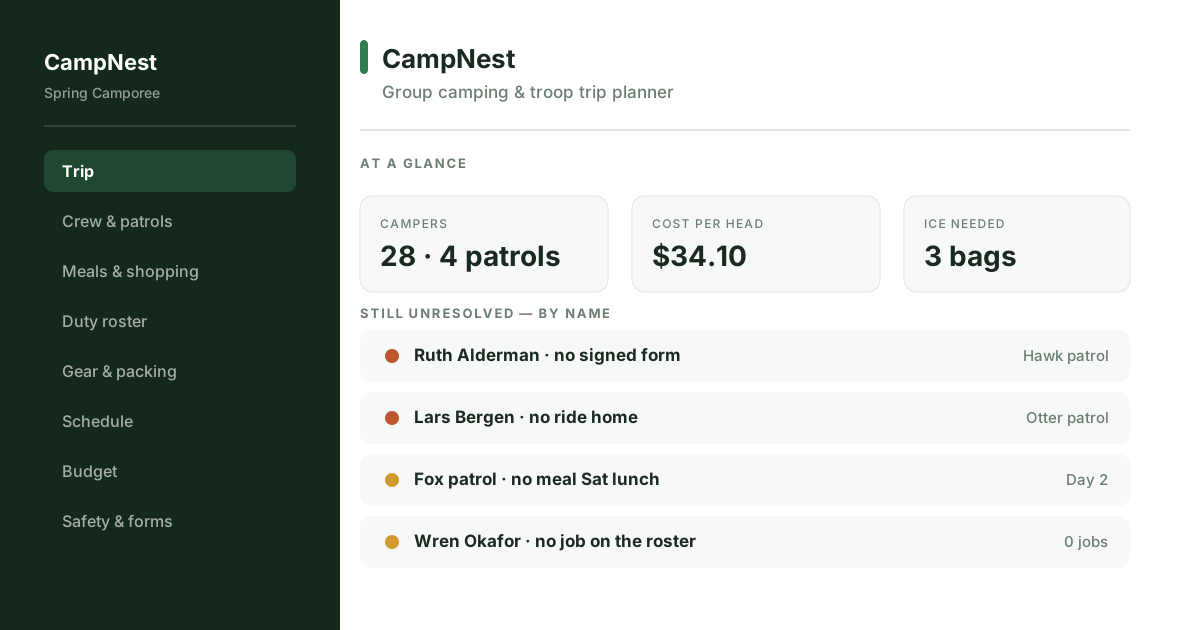
Use the app for coordination, not as a safety authority
A group trip has many small records that fail independently: meals, rides, forms, equipment, schedules and contact information. CampNest keeps those planning records in one place and highlights entries that are still incomplete according to the data you entered.
The food and budget arithmetic is also planning math. Recipe quantities, appetite multipliers, ice estimates and cost-per-person figures depend on the assumptions in the file. They are not nutrition, allergy, refrigeration, food-safety or medical recommendations.
Food quantities by group
Scale planning quantities from the headcount and appetite multiplier you enter, then merge repeated ingredients into a shopping list. Treat the result as a planning estimate and adjust for actual dietary needs, packaging and food-safety requirements.
Menu grid by group and day
Assign meals to a group and time slot, then see which planned meal slots are still empty. The app does not determine nutrition, allergies or safe food handling.
Duty-roster rotation aid
Rotate six user-defined jobs and show a jobs-per-person total so the organizer can review the distribution. The app does not decide age-appropriate duties, staffing levels or supervision requirements.
Shared gear record
Record who was assigned tents, stoves, jugs, first-aid kits or other equipment and whether an item was returned. It does not inspect gear or determine whether equipment is safe or suitable.
Forms, contacts and rides
Keep user-entered flags for permission forms, medical-information forms, emergency contacts and transport arrangements. A checked box is an organizational status, not proof that a form or transport plan is legally sufficient or safe.
Budget per person
Combine user-entered site fees, food, fuel and shared-kit estimates and calculate a planning cost per person from those inputs.
Printable schedule
Keep camp activity blocks in one schedule that can be printed for the people running the program.
Scoped printing
Print the whole plan or selected shopping, duty-roster and schedule sections without exposing unrelated parts of the working file.
Recoverable local changes
Deleted items remain recoverable for a period and sample data can be toggled without replacing the organizer’s own working record.
Start free if food and a basic roster are enough
The free Camping Meal Planner & Grocery List covers one group’s menu, shopping list and a basic duty roster. Read Group Camping Planner vs Checklists before moving to CampNest when several groups, gear assignments, transport records, forms and schedules need to stay connected.
What it does not do
CampNest does not determine whether a campsite, route, activity, vehicle, driver, supervision ratio, permission form, emergency plan, first-aid arrangement, medical-information process or food plan is safe, lawful, age-appropriate or adequate. Rules and risk controls vary by organization, location, participant needs and activity. Use current organizational policies, official guidance and qualified medical or safety advice where appropriate.
The working file is local and has no automatic multi-user sync. Keep independent backups, and use a shared system instead if several leaders need simultaneous access to the same current plan.
How it works
- Buy and download instantly — no account needed.
- Open the file in a supported browser on a device you control.
- Set the group terminology and load sample data if you want to explore the workflow first.
- Add participants, groups, meal assumptions, assignments and schedules based on the plan you have independently approved.
- Export a backup and print only the sections needed by the relevant people.
Need the connected group plan?
One-time purchase, yours to keep. Use the example camp first if you want to see the workflow before entering your own plan.
Buy for $9.99 (50% off) →Questions before buying? Get in touch — or see the FAQ.