IEPNest — keep the family-side IEP record connected
IEPNest gives parents and guardians one place to copy the IEP service schedule, log dates from information they receive, keep meeting and goal-report notes, index evidence references and track open follow-ups. It helps you prepare questions and find your own records later; it does not audit the school, determine compliance or prove that a service was missed.
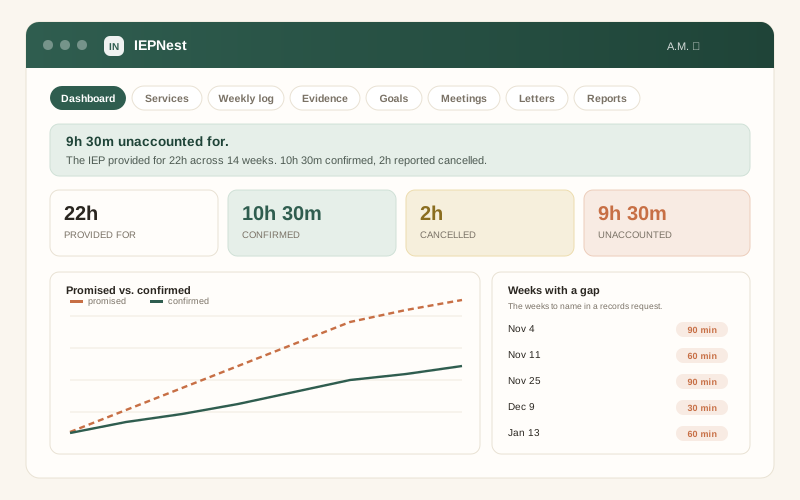
The distinction this app is built around
Schools and service providers may keep official service and progress records. A parent or guardian can also keep a separate family-side chronology based on the IEP, messages, notes, reports and other information they receive. Those two records are not interchangeable.
IEPNest therefore keeps status categories rather than turning every gap into a conclusion. Confirmed is for an entry you choose to mark as confirmed from the information available to you. Cancelled is for a cancellation you record from a source such as a school communication. Unaccounted is the remainder in your own log. It means the family-side record does not yet explain that entry — not that the app has determined a missed service, violation or remedy.
A family-side service record
Copy the service schedule from the IEP, then log dates and status from information you receive or observe. IEPNest can show which entries in your own record are still unaccounted for without labeling them as missed services.
More than one child, more than one year
Each child keeps a separate service, meeting, goal and evidence-reference history. Changes can be dated so earlier and later periods remain distinguishable in the family-side record.
Drafts built from your own log
Create editable drafts for requesting records, raising a concern, asking for a meeting or summarizing your notes. Review the wording yourself and follow the school or district process that applies to your situation.
Evidence references you can find again
Record what an item is, its date and where you stored it. IEPNest indexes references; it does not turn a parent note into an official school record or legal evidence.
Goal reports kept side by side
Record the progress information the school provides across reporting periods so you can compare the reported entries over time. The app does not decide whether progress is adequate or legally compliant.
Meetings and open follow-ups
Keep who attended, what you asked, what was recorded as agreed and which follow-up items are still open, based on the information you enter.
A printable family summary
Print dates, user-entered figures and open questions in one packet for your own preparation. It is a family-side summary, not a district record, finding or filing.
Five export paths, no lock-in
Print, PDF, self-contained HTML, CSV and JSON give you several ways to keep or share the information you entered. Check privacy before sharing a child’s records.
Deliberate deletion safeguards
Wiping local data requires confirmation and gives you time to stop the action. Keep independent backups because the browser file is not a school record system or cloud archive.
Choose the smallest level of support that fits
IEPNest is an organization tool. It can replace a scattered spreadsheet-and-notes workflow, but it does not replace official school records or professional advice.
| Option | Best fit | What it does not do |
|---|---|---|
| Free IEP Service Minutes Log | One child, one school year, one focused service-minute record | Does not connect a larger meeting, goal and evidence history |
| IEPNest | Several connected family-side records across children or years | Does not determine compliance, rights, remedies or legal deadlines |
| School or district records | Official records and information held by the education provider | Your family-side notes are not a substitute for them |
| Qualified advocate or attorney | Individualized help when rights, disputes, procedures or remedies need professional analysis | IEPNest does not replace that judgment or representation |
| Shared cloud system | Several people need live editing or automatic cross-device sync | A local IEPNest file does not provide simultaneous shared editing |
Try the free version first
The free IEP Service Minutes Log covers a focused family-side service-minute record for one child and one school year. If that is all you need, use it and keep your money. Read the IEP Service Minutes Guide for the recordkeeping model before moving to IEPNest when several years, meetings, goals, evidence references and follow-ups need to stay connected.
How it works
- Buy and download instantly — no account needed.
- Open the file in any browser. The working record runs locally in that browser.
- Copy the service schedule and other source information you want to organize, then keep your family-side log current.
- Export a JSON backup regularly and keep a separate copy. There is no GentleTools cloud copy to recover from.
What it is not
- Not the school or district record. Your family-side chronology is a separate organizational record.
- Not proof that services were missed, that an IEP was violated or that a particular remedy is owed.
- Not legal advice, a complaint, a filing, a deadline calculator or a determination of education rights.
- Not a diagnostic or clinical tool and not a way to judge whether educational progress is adequate.
- Not automatically synced. Two people on different devices do not share one live record unless they deliberately exchange files.
- Not a document-storage service. It can index where you keep source documents; keep the originals in storage you control.
Need the larger family-side record?
One-time purchase, yours to keep, no subscription and no required account.
Buy for $4.45 →Browse home, family & travel apps →
Questions before buying? Get in touch — or see the FAQ.
IEPNest is a family-side record-keeping tool for parents and guardians. It does not interpret federal, state or local special-education law, determine FAPE or other entitlements, decide compliance, calculate procedural or filing deadlines, recommend a complaint or remedy, or represent you. Requirements and procedures depend on the jurisdiction and facts. Verify important questions against the current IEP, official school or district records and applicable guidance, and use qualified local professional help when needed.