LegacyNest — Life Admin & Family Record Organizer
Keep the practical information your family may need to find later — people, document locations, account references, digital-life notes, personal wishes and letters — in one local file you control. It is an organizational record, not a substitute for valid legal, medical, tax or estate documents.
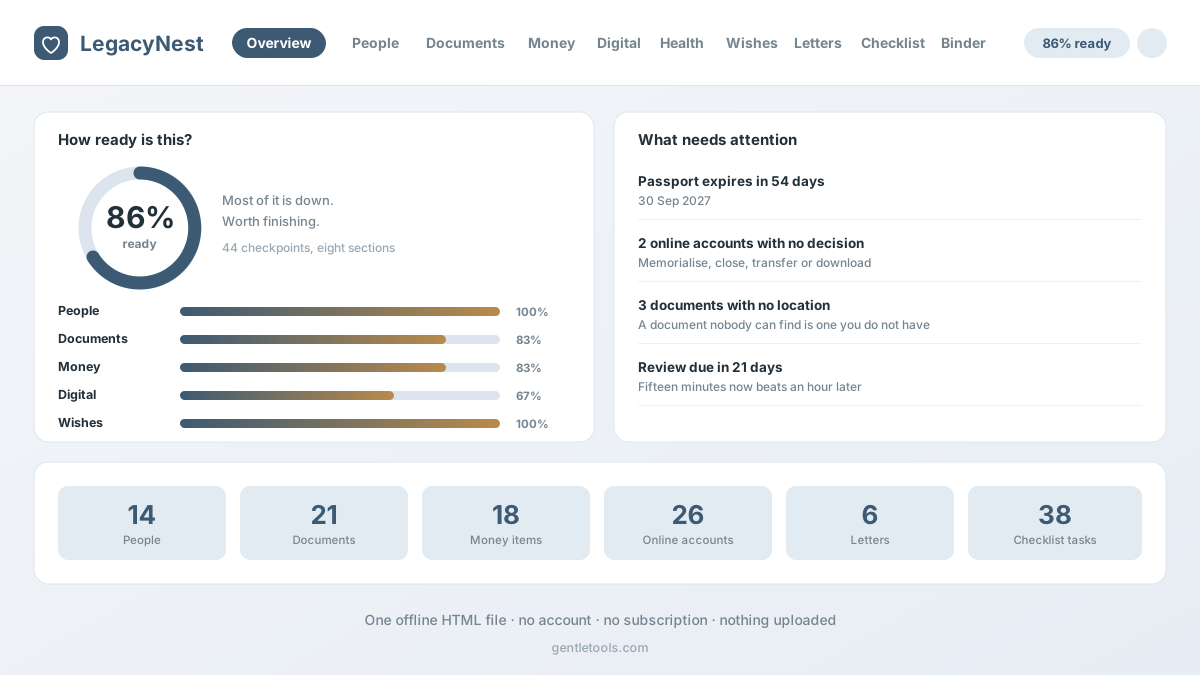
Why a local organizational record can help
The useful part of this workflow is not replacing professional documents. It is making the surrounding information findable: who the key people are, where the source documents live, which institutions exist, which subscriptions repeat, what personal preferences have been written down and what the family still needs to discuss.
LegacyNest is a single local-first file rather than a hosted account. That gives one main record keeper control over the working copy, but it also means there is no automatic cloud recovery or shared live editing. Keep independent backups and use a shared or professional system instead when several people need controlled simultaneous access.
Do not turn the organizer into a secrets vault
Do not store passwords, PINs, recovery codes or full account numbers in LegacyNest.Anyone who can open the local file can read its contents. Keep secrets in an appropriate secure password or document system and use LegacyNest only for safe references, locations and contact information that you intentionally choose to record.
Readiness checklist, not a legal score
Work through 44 organizational checkpoints across eight sections and see which records or conversations you still want to complete.
People and roles
Record the people and roles named in your own documents or plans — such as executor, health-care proxy, attorney, accountant or trusted contact — plus who knows where the record is kept.
Where documents are stored
Record locations for wills, deeds, titles, directives, passports and other source documents without turning the app into the source document itself.
Accounts and obligations
Keep institutions, insurance references, property, debts and recurring subscriptions together with your own notes about who should review them later.
Digital-life references
Record services, devices and legacy-contact arrangements without storing passwords, PINs, recovery codes or other secrets in the file.
Health reference information
Keep user-entered blood type, conditions, allergies, medications, clinicians and directive locations together for reference. Verify medical information against current source records.
Personal wishes and preferences
Write down preferences for memorials, music, readings, flowers, obituary notes and other personal choices. The app does not make those notes legally binding.
Belonging notes
Record who you would like to receive a personal item and why, while keeping formal ownership or estate instructions in the appropriate valid documents.
Letters
Write personal letters, note when you would like them read and print them separately. They are personal messages, not legal instruments.
After-loss organization checklist
Use a staged checklist for contacts, documents and administrative follow-up. Actual legal, probate, benefits, tax and registration procedures depend on the jurisdiction and situation.
Printable family binder
Print a cover page, family reference page, selected sections and letters so the people you choose can find the organizational information you entered.
No passwords or full account numbers
The file is not a password vault. Keep secrets in an appropriate secure system and store only safe references or locations here.
Layers against accidental deletion
Undo, recently deleted records, local snapshots and confirmation steps help reduce accidental loss inside the app.
Import, export and print
Use CSV, JSON, print and standalone HTML exports so the organizational record is not locked to one screen.
Local-first file
One HTML file with no required GentleTools account or monthly subscription. You are responsible for secure storage and independent backups.
Start with the free readiness path
Use the free Solo Aging Readiness Check to identify gaps before building a larger record. The Aging Solo knowledge hub goes deeper on planning conversations and practical preparation. If the family later needs one connected organizational record, move to LegacyNest.
For the after-loss side alone, the free What to Do When Someone Dies checklist is the smaller starting point. Always verify current legal, probate, tax, benefits and registration procedures with the relevant official or qualified local source.
Two useful reference pages — with clear limits
The family reference page. Put the people to contact, safe document locations, pet or household notes and personal preferences in one printable place. It is a navigation aid, not a legal checklist and not an instruction about what somebody is legally required to do first.
The wallet reference card. You can print user-entered emergency-contact and health-reference details for convenience. Verify those details against current medical records; the card is not an official medical ID, emergency record or substitute for clinician or emergency service information.
What the app does not decide
LegacyNest does not create or validate a will, power of attorney, advance directive, beneficiary designation, organ-donation authorization, funeral contract or property transfer. It does not decide who legally controls an account or estate, what probate steps apply, which taxes or benefits are due, or what medical care should be given. Those questions depend on valid source documents, current law, provider rules and individual facts.
How it works
- Buy and download instantly — no account needed.
- Open the HTML file in a supported browser on a device you control.
- Load the sample record if useful, then clear it and enter only the information you actually want stored.
- Print selected reference pages and tell the people you choose where the authoritative source documents are kept.
- Export independent backups and review the record when people, accounts, documents or preferences change.
Need the connected family record?
One-time $4.99, yours to keep, with free updates included.
Buy for $4.99 (50% off) →Questions before buying? Get in touch — or see theFAQ for refunds and delivery.