ShootNest — the business manager that tells you which shoots actually pay
A $3,800 wedding across 42 real hours pays $90.48 an hour before direct costs. A $1,400 brand shoot across 12 pays $116.67 before direct costs. Revenue alone ranks the wedding first. ShootNest adds time and job costs so you can compare the work on the numbers that actually consume your week.
Why it's different
Full studio-management platforms can be the right choice when client portals, automated communication, contracts, galleries, payment integrations and team access are central to the business. ShootNest takes a narrower approach: it is built for the photographer who wants the commercial records and profitability math together without making a cloud subscription the center of the workflow.
The question ShootNest keeps visible is how many hours the job consumed. Photography is unusual because the visible part of the job can be a small and inconsistent fraction of the real one, and the multiplier changes by type of work. Shooting, travel, prep, editing and admin all compete for the same week.
ShootNest also refuses to flatter you. A shoot with no hours recorded has no honest hourly rate, so it is counted in what you charged and left out of every per-hour figure — and the app tells you how many it left out instead of quietly absorbing them.
The effective hourly rate
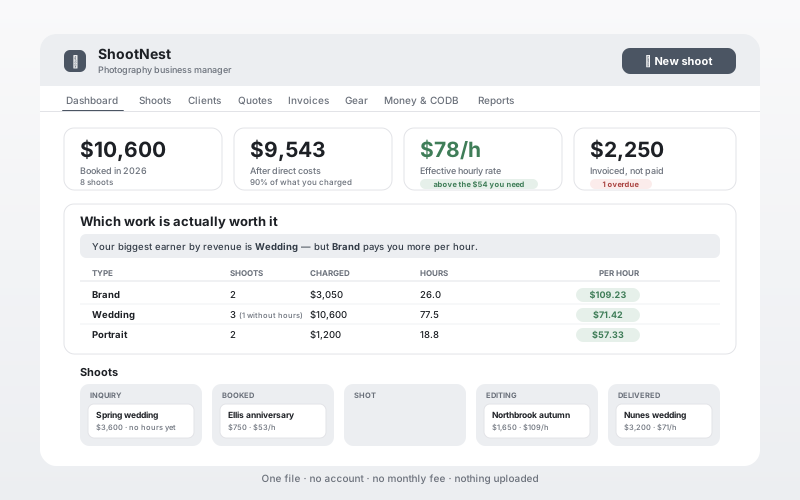
Every shoot records five hour buckets — shooting, travel, editing, admin, prep — and five cost lines. From those comes the one number a revenue-only report misses: what the job actually paid you per hour.
Which work is worth it, ranked honestly
Your types of work sorted by what they pay per hour rather than what they invoice. The dashboard says it out loud when the two disagree: your biggest earner by revenue may not be your best-paying work.
Quotes that tell you before you send
Each line carries what the client pays, what it costs you, and how many hours it takes. The client sees only the first. Underneath, the app tells you the effective rate — and, when a quote falls short, exactly what you would need to charge instead.
Cost of doing business, built in
Annual overhead, the salary you actually want, tax and jobs per year give you a per-job and a per-hour threshold. Everything else in the app compares itself against those two numbers instead of guessing.
A shoot board you drag
Inquiry, Booked, Shot, Editing, Delivered. Every card shows the fee and the effective rate, so the pipeline is not just a to-do list — it is a view of what is coming and what it is worth.
Invoices that flag themselves
Issued, due, paid. Overdue is worked out from the due date, so an invoice raises its hand without you remembering to check. The dashboard puts the late ones in front of you.
Clients ranked by what they pay per hour
Not just lifetime spend. A client who books small jobs that edit quickly can be worth more of your week than one with a bigger invoice — and where they came from is recorded, which is useful marketing context.
A gear list for your records
Serial numbers, purchase dates, what you paid and what it costs to replace today. Keep an exported copy somewhere separate from the equipment itself.
Yours, not rented
One file on your own computer. No GentleTools account, no required monthly software fee and nothing uploaded for the core workflow.
How it works
- Buy and download instantly — no account needed.
- Open the file in any browser. It works offline and loads nothing from anywhere.
- Fill in the cost-of-doing-business section once. It takes ten minutes and everything else compares against it.
- Add each shoot with its hours and its direct costs. Estimate honestly at first; time one job properly and use the measured figure after that.
- Build quotes and watch the rate as you type. Print the client version — none of your costs appear on it.
- At year end, print the hours breakdown, the year summary and the gear list.
What it does not do
No client portal, online gallery hosting, e-signature workflow, card processing, automated email sequences, calendar sync or multi-user cloud access. If those are essential, a hosted studio-management platform is likely the better fit. ShootNest is for the photographer who wants private business records and profitability visibility without adding those cloud workflows.
Start free or compare the software model first.
The Shoot Quote Builder handles one quote. For a broader business decision, read Photography CRM vs Business App or browse the offline business software collection before buying.
Ready to try it?
One-time purchase, yours to keep. A free trial holds five shoots and five entries per section — everything you enter stays in the file if you upgrade.
Buy for $7.99 (47% off) →Questions before buying? Get in touch — or see the FAQ.