SweepNest — Cleaning Business Manager
For the cleaning business that runs on a phone full of notes and a Sunday evening of paperwork. Recurring jobs on a real month calendar, the access note for every property, quotes that turn into work, and invoices that flag themselves overdue — in one HTML file that works with the internet switched off.
Instant download after checkout · secure payment via Stripe · the trial needs no email
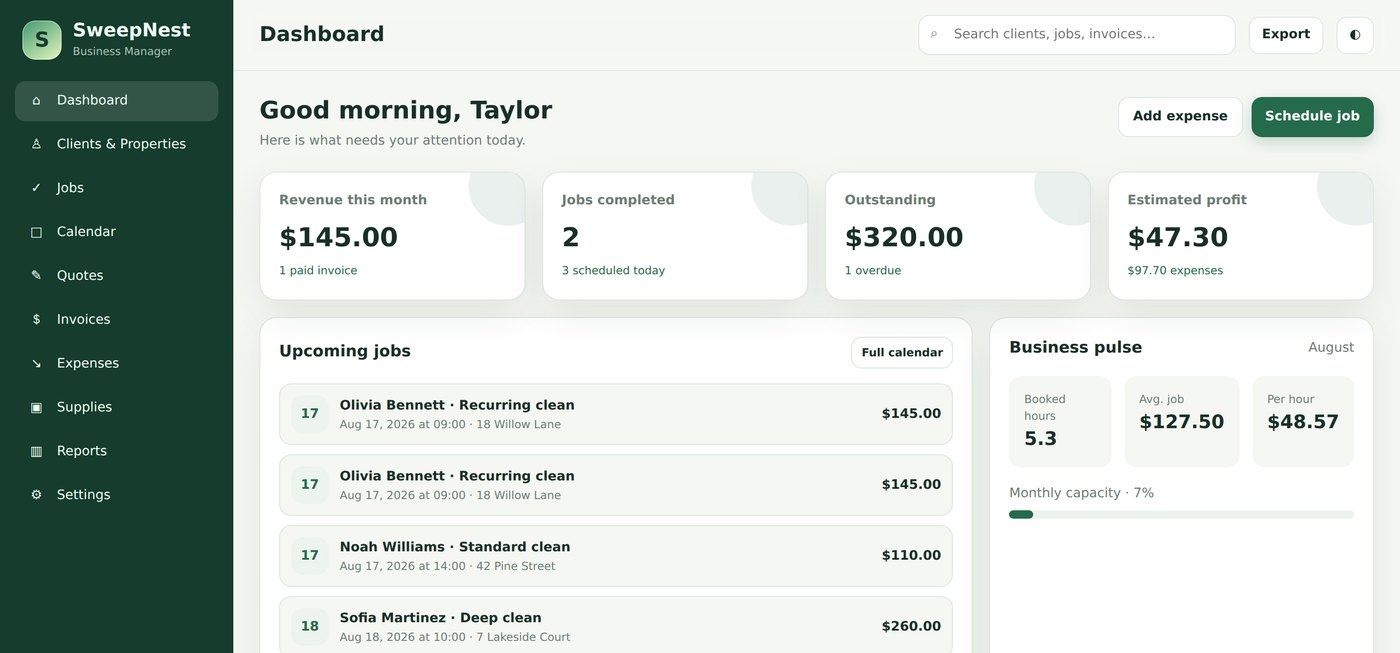
The problem it actually solves
Nobody starts a cleaning business to do admin. So the schedule lives in a paper diary, the addresses live in a phone, the receipts live in the van, and once a month there is an evening of trying to remember who was cleaned and who was invoiced. Cleaning software fixes that for a monthly fee that keeps arriving in January when nobody books a deep clean. A spreadsheet template asks for a Google account and still cannot tell you what next Tuesday looks like.
SweepNest is the middle option: a proper business manager that you buy once, open like a file, and use with no account, no internet and nobody else's server involved.
What is inside
Clients & properties
The address you drive to, the access note you cannot remember on a Monday morning ("key in lockbox", "garage keypad"), the products a client reacts to, and a default checklist for that property.
Jobs that repeat
Set the weekly clean once with an end date. Every visit is created as its own job, so moving one week, repricing the pre-Christmas visit or cancelling a holiday week never touches the rest.
A month you can read
The calendar shows every visit with the start time and client name. Gaps and double-bookings are visible in a way a list will never show you.
Quotes that become work
Price the first deep clean, mark it Accepted, and turn it into a scheduled job with the client and total already filled in.
Invoices that chase themselves
Paid, sent and overdue totals sit at the top of the screen, and a sent invoice flips to Overdue on its own the day it passes its due date. Print it on your own business details.
Expenses & supplies
Cloths, fuel, insurance and equipment by category and vendor. Stock counts with a reorder level, so low gloves show up on the dashboard before Thursday, not after.
The numbers most cleaners guess at
Net before tax, and revenue per hour by service — which is where a deep clean that felt profitable turns out to pay less per hour than a standard clean.
Six themes, five currencies
Forest, ocean, lavender, rose, slate and sunset, each with a dark mode. USD, EUR, GBP, CAD or AUD, and your own tax rate and invoice footer.
The screens
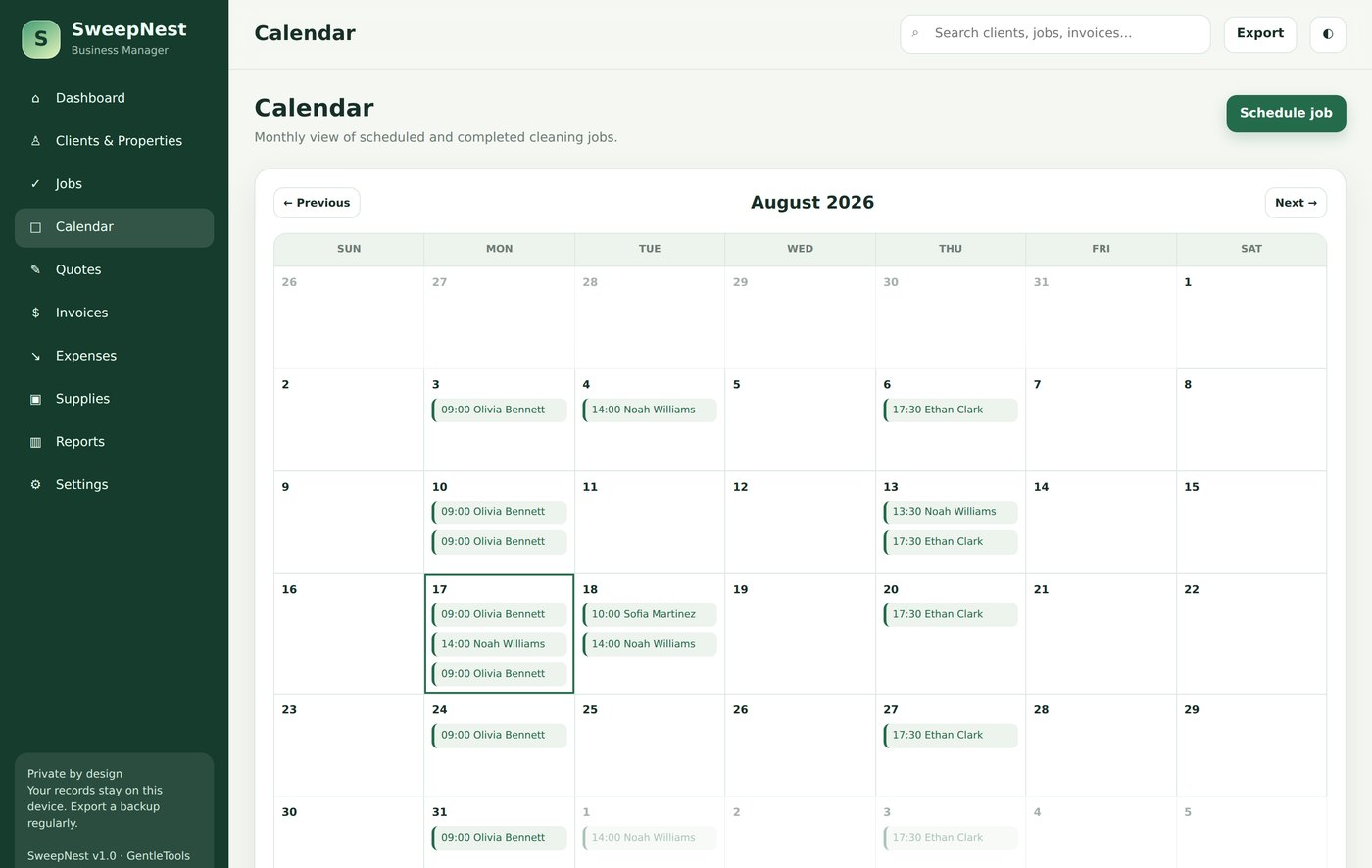
A weekly clean, a biweekly clean and an office clean, each set once. Every visit is its own job, so one week can move without disturbing the others.
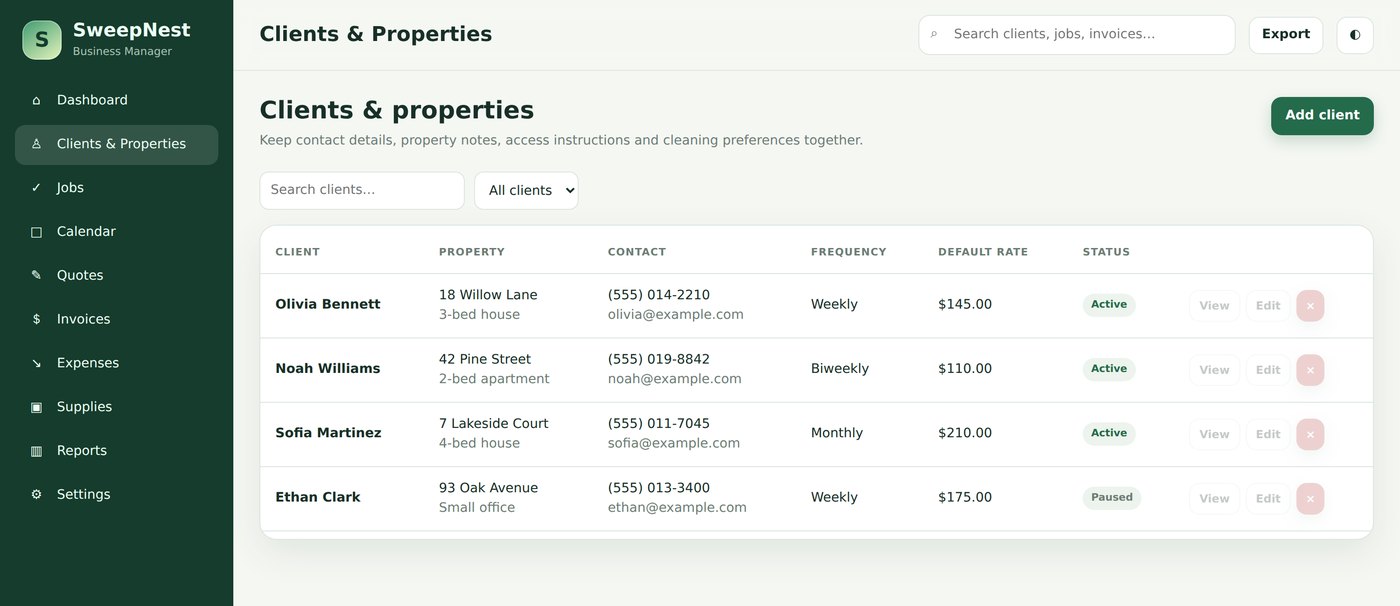
Clients are people and properties: frequency, default rate, access instructions and a checklist that appears as tick boxes on every job for that address.
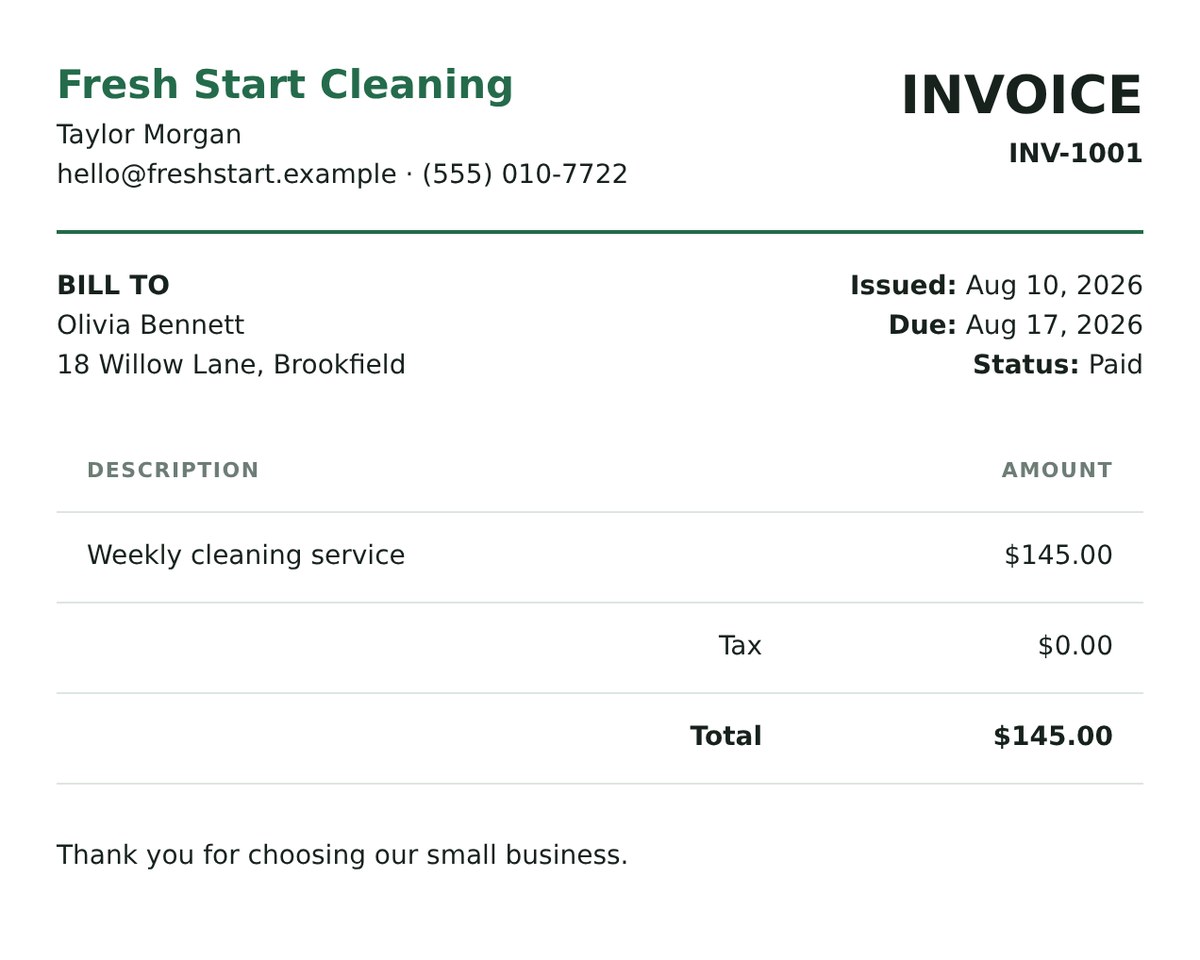
Mark a job completed, create the invoice in one click, print it on your own business name and footer line. Sent invoices become Overdue by themselves.
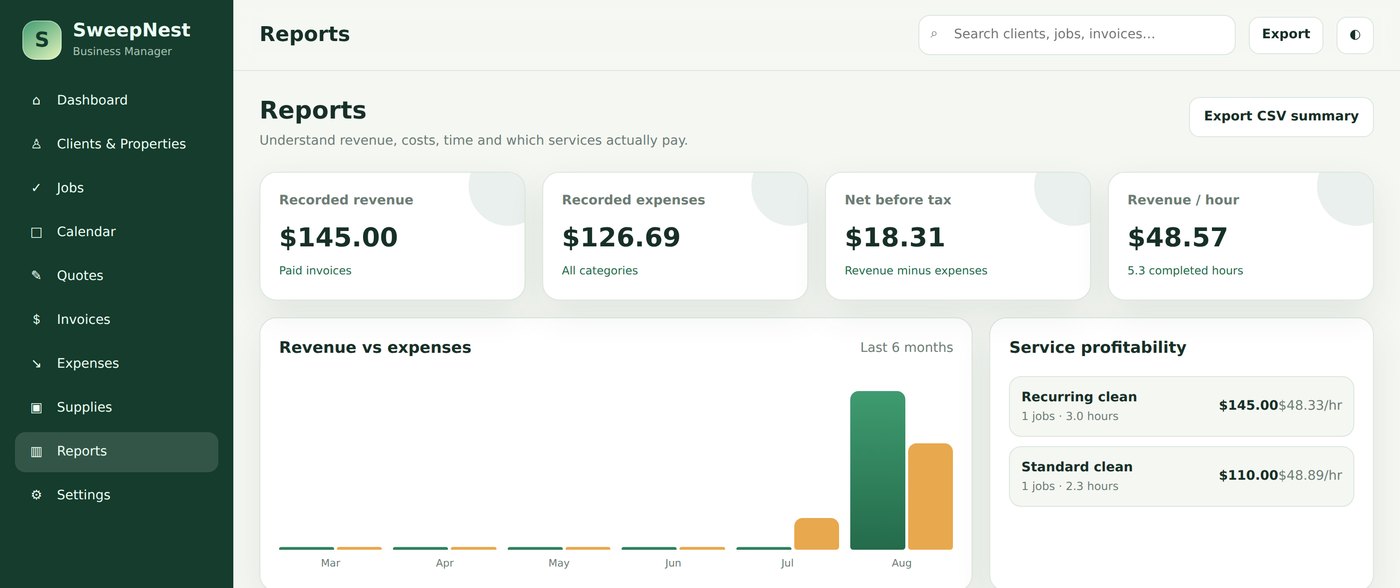
Net before tax, revenue per hour, and profitability per service. Six months of revenue against expenses, so a bad month is visible while it is still fixable.
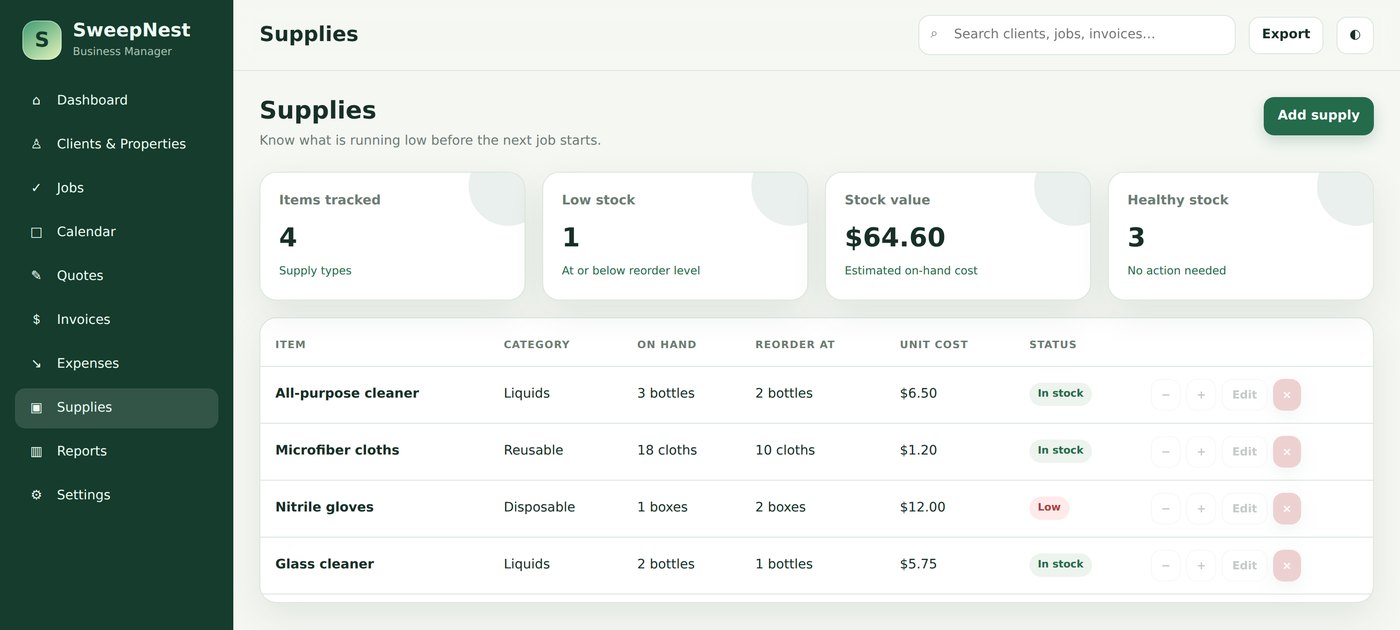
Supplies with a reorder level. Low stock lands on the dashboard under Needs attention — before the job, not after.
How to set it up in ten minutes
This is the short version of the manual, free to read whether you buy or not. Do it in this order and nothing has to be redone.
- Open the file. Save SweepNest.html somewhere you will find it again and double-click. It opens in Chrome, Edge, Firefox or Safari. Bookmark the tab or drag it to your taskbar — you will open it daily.
- Make it yours (Settings). Business name, your name, email, phone, currency, default tax rate and the one-line invoice footer. These are what print on every quote and invoice.
- Clear the example business. SweepNest opens with a small demo so nothing looks empty. Settings → Clear all business data — do this before you type in your own clients, not after.
- Add your regulars first. For each: address, property type, frequency, default rate, access note, and the checklist for that property, one task per line.
- Schedule the recurring work. Jobs → Schedule job → pick the client, the day and time, then Repeat: Weekly or Biweekly with an end date about three months out. Every visit appears on the calendar.
- Then use it like this: after each job, open it → Mark completed → Create invoice. Log expenses on Friday. On the last day of the month, look at Reports and export a backup.
The one habit that matters
Your records live in this browser on this device — that is what keeps them private, and it is also the risk. Settings → Export full backup gives you a single dated file with everything in it. Do it monthly, keep it somewhere that is not only this laptop, and restoring on a new computer is one click. The manual has a whole chapter on this because it is the only way to lose your data.
What comes with it
- SweepNest.html — the app itself, about 65 KB, ten sections, works offline.
- SweepNest — User Manual (PDF, 21 pages) — setup, recurring jobs, invoicing, printing, backups, troubleshooting and honest limits. Written for this app, not a generic guide.
- Free updates to version 1.x, from the same download link.
What it does not do
- Take card payments or connect to your bank.
- Send emails, texts or booking reminders for you.
- Sync between your phone and your laptop — one file, on purpose.
- Track staff GPS or clock-ins from other devices.
- Do your bookkeeping or file your taxes.
If you run fifteen cleaners across three cities with live check-ins, you need real software with a monthly bill. SweepNest is built for the size of business where that would be overkill.
Questions people ask before buying
Is there a free trial?
Yes. The trial keeps up to 3 clients, 5 jobs and 2 invoices, with export, backup and printing switched off. Every screen is there — nothing is hidden behind the paywall except volume and the files you take out of it.
What exactly do I get when I buy?
Two files: SweepNest.html, which is the app, and a 21-page PDF user manual written for this app — setup, recurring jobs, invoicing, backups and troubleshooting. No account, no installer.
Where is my data stored?
In your browser, on the device you open the file with. There is no server and no account, so nothing is uploaded. That also means clearing your browser data can remove it — export the backup file monthly, and restoring it takes one click.
Does it work on a phone or iPad?
It opens and works on a tablet or phone in Chrome or Safari, and the layout adapts. Invoicing and month planning are far more comfortable on a laptop. It does not sync between devices — one file, on purpose.
Can it take card payments or send reminders?
No. SweepNest records the work and the money; it does not connect to a bank, send emails or text your clients. If you need automated messaging and card payments, you need software with a monthly bill.
Is this accounting software?
No. It is a record-keeping tool. It shows revenue, expenses and net before tax as arithmetic on what you typed in, and it does not calculate or file your taxes. For that, talk to an accountant in your country.
Test the economics before you buy software.
Start with the free Post-Construction Cleaning Bid & Crew Plannerwhen the immediate problem is one cleaning bid and crew-capacity check. ReadCleaning Business: Spreadsheet vs App vs Cloudwhen you are choosing the software model. Then compare theoffline business software collection or browse allsoftware decision guides before buying.
Try it before you pay for it
The trial is the whole app with small limits. If it fits the way you work, the full version and the manual are a one-time $9.99.
Buy for $9.99 (50% off) →Free trial →Questions before buying? Get in touch — or see theFAQ for refunds and delivery.
One-time purchase, single-user licence. SweepNest is a record-keeping tool, not accounting, legal or tax advice.