Beneficiary Snapshot
One beneficiary’s benefits, account roles, recent activity, open notices and evidence coverage in one factual view.
Search free tools, interactive studios, fitness, offline apps, planners, and practical guides.
↑↓ browse Enter open Esc close
Explore the real app interface in a free browser preview. Buy only when you're ready to keep your full offline HTML file. No subscription.
Keep benefit money records explainable without turning the app into a rule engine. Organize beneficiaries, benefit sources, standard and dedicated accounts, deposits, expenses, receipts, notices, reconciliation and reporting periods in one private local-first workspace.
No account · no bank connection · no SSN required · JSON backup + CSV + print/PDF
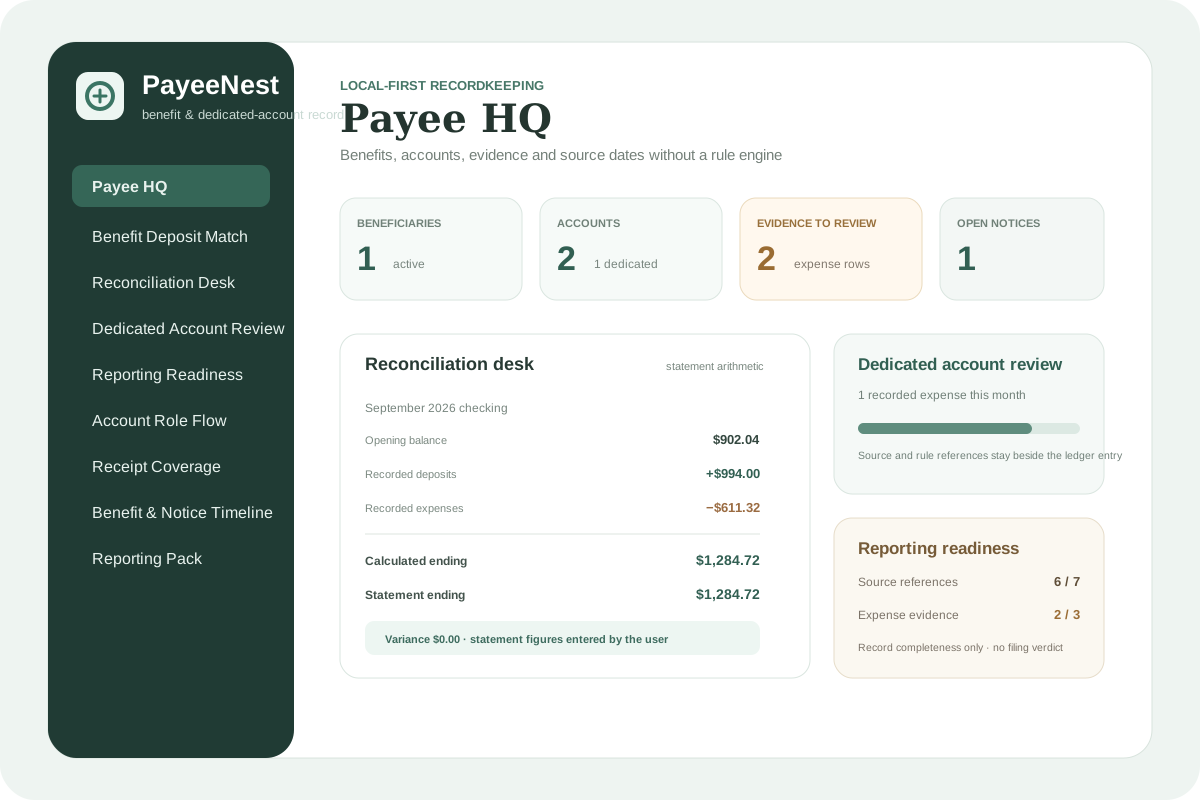
PayeeNest separates beneficiaries, benefit sources, account roles, transactions, receipts, notices and reconciliation so the record can be reviewed later. When a dedicated-account transaction is unclear, the app surfaces the source gap instead of inventing a legal conclusion.
One beneficiary’s benefits, account roles, recent activity, open notices and evidence coverage in one factual view.
Compare the opening balance you entered plus recorded money movement with the statement ending balance you entered.
Chronological transactions by account, separating deposits, expenses, transfers and adjustments.
Surface dedicated-account activity and its source references without deciding whether a use is permitted.
Find expense transactions that do not yet have a receipt or evidence record linked to them.
Transparent totals by transaction type and category from the records actually entered.
Keep agency notices with response or review dates copied from source documents. No deadline is guessed.
Build a printable factual review pack for the beneficiary and reporting period you select before an accounting or meeting.
Pair internal Transfer out and Transfer in records by your own reference so account moves do not look like outside income or spending.
See which ledger rows have statement references, linked evidence and rule or notice references — a completeness audit, not a compliance verdict.
Compare deposits explicitly linked to a benefit source with the amount recorded on that source and preserve the difference for review.
Review transaction source references, expense evidence, reconciliations and open notices inside a selected reporting period before using an official form.
See paired internal transfers by the account roles you assigned, with dedicated-account movement highlighted for manual source review only.
Place benefit effective dates, notice dates and linked deposits on one factual timeline without inferring why a payment changed.
Check that transactions, accounts, benefit sources and receipts belong to the same beneficiary, and find transfers without pair references before using an accounting packet.
The free SSI Dedicated Account Tracker is intentionally focused. PayeeNest becomes useful when there are multiple account roles, several benefit sources, recurring notices, broader spending records and reconciliation across periods.
PayeeNest guide: build an explainable representative-payee record →
Representative payee record-keeping checklist: a monthly workflow →
Representative payee bank reconciliation: keep the ledger explainable →
SSI dedicated accounts: rules, expenses and receipt records →
PayeeNest is independent recordkeeping software, not an SSA system and not legal, financial or benefits advice. It never determines whether a dedicated account is required, whether a use is permitted, whether a resource is countable or whether a report satisfies SSA requirements. Verify material decisions against the current notice, official SSA guidance or appropriate professional assistance.
No. It deliberately does not make eligibility, allowability or compliance decisions. It records the transaction and the source or notice you relied on so you can verify the rule yourself.
No. PayeeNest is local-first recordkeeping. You enter the figures and references you want to track.
No. Use neutral labels or short references. Keep credentials and highly sensitive identifiers out of the app.
The free tool focuses on one dedicated account. PayeeNest adds multiple beneficiaries, benefit sources, account roles, full transaction ledgers, Benefit Deposit Match, notices, reconciliation, Receipt Coverage, Reporting Readiness, Account Role Flow, Benefit & Notice Timeline, reporting periods and record-linking.
The app keeps the live working record. The matching planner gives you printable worksheets. The guides explain the workflow in more depth.
Representative-payee records, account roles, receipts and reconciliation without turning the workbook into a rule engine.
Open matching planner →Primary guidePayeeNest Guide: Representative Payee Records Without Turning the App Into a Rule EngineHow to use PayeeNest for beneficiaries, account roles, transactions, receipts, dedicated-account records, reconciliation, notices and reporting preparation.
Read guide →Related guideRepresentative Payee Bank Reconciliation: How to Match the Ledger to the Source BalanceA practical explanation of representative-payee account reconciliation, transfer pairs, source references, receipt gaps and what a variance does and does not mean.
Read guide →Related guideRepresentative Payee Record Keeping Checklist: A Monthly Workflow for Explainable RecordsA practical monthly representative-payee recordkeeping checklist for benefit sources, account roles, transactions, receipts, reconciliation, notices and backups.
Read guide →Not ready for the full app? These separate free mini studios help you try a specific record or decision workflow.